


JBL Portable
4.77.11K Reviews
App Specs
- Version
- 6.9.33
- Updated On
- License
- Free
- Downloads
- 10,000,000+
- Developer
- Harman Consumer, Inc.
- Categories
- Entertainment
- Platform
- Android, iOS
Screenshots
 Analysis by AppCompare
I like to think of JBL Portable as a companion for the speakers I already own, not as a music player in its own right. That distinction matters: I still choose and play audio elsewhere, while this free entertainment app from Harman Consumer, Inc. gives me a place to manage compatible JBL portable Bluetooth speakers. If you want direct control of your speaker setup without treating your phone like a mixing desk, that’s the appeal.
Its audience is fairly clear. With a 4.7 average from around 336,000 ratings and over 10 million installs, it has drawn a large crowd, but the app is useful only if you have a supported JBL speaker. It is rated for Everyone, and version 6.9.12 is listed for Android 9 and up. Those details make it easy to check basic fit before installing; the more important question is whether you want speaker controls that your usual music app may not provide.
A practical routine for connecting and listening
My preferred routine is to connect the speaker through the phone’s Bluetooth settings first, then open the app and select the speaker it recognizes. Keeping those two steps distinct helps when I’m troubleshooting: if the speaker is not connected to the phone, changing an in-app setting is unlikely to fix the underlying pairing problem. Once the connection is established, the app is most useful for speaker-specific controls rather than browsing tracks or managing a general audio library.
That makes it handy in ordinary situations. I might bring a speaker into the kitchen, connect my phone, and use the app to check its available controls before starting a podcast. For a gathering, I can get the main speaker playing first and then look at whether my other compatible speakers can join the setup. Doing it in that order is less confusing than trying to troubleshoot pairing, audio playback, and speaker linking all at once.
Settings worth checking before you settle in
Sound adjustments are worth treating as small, context-dependent changes rather than a one-time “best” setting. A bass-heavy choice that works well at low volume in a bedroom may feel muddy when people are talking nearby. For speech, I’d listen to a familiar podcast and make modest adjustments, then switch back to music and check whether the result still feels balanced. The practical tip is to change one thing at a time; otherwise, it is hard to tell which adjustment helped.
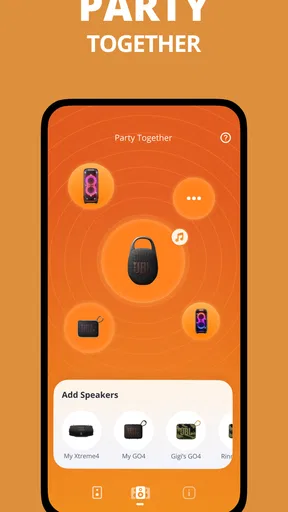
Speaker grouping deserves the same deliberate approach. JBL’s PartyBoost is intended to connect compatible speakers, but compatibility is the key condition: owning two JBL speakers does not automatically mean they can be linked together. I’d check the model’s own support information before planning a party around a multi-speaker arrangement. If the speakers do work together, set up the group while they are close by, test the playback, and only then place them around the room. That gives you a chance to catch a connection issue before guests arrive.
Where this app fits among audio controls
Compared with relying only on a phone’s Bluetooth menu, JBL Portable gives you a more speaker-focused place to manage compatible devices and their available settings. Compared with a streaming app, it has a different job: it does not replace the service where you pick albums, queue tracks, or discover new music. I find that separation sensible. The phone handles playback, while the JBL app handles the speaker side of the experience.
Worth Reading Before You Choose

Flipboard Shows What News Apps Must Do Beyond the Feed

Switching to Android Auto Means Rethinking Your Driving Routine

Google Calendar Makes a Crowded Week Easier to Manage

Ludo King Makes the Most of the Minutes Between Plans

Baby Panda World Brings Quick Play to Modern Phones, but Its Game Library Feels Busy

ESPN’s Live Game View Makes Following Close Games Easier
The trade-off is that this extra control has little value if you use headphones, a different speaker brand, or a JBL model the app does not support. In those cases, your phone’s normal audio controls may be enough, and installing another app can add clutter without improving your routine. Even with a compatible speaker, I would not keep opening the app just to play music; I use it when I want to adjust a setting, manage the supported speaker setup, or check for a firmware update.
Getting more from repeat visits
A useful habit is to make adjustments in the place where you actually listen. Room shape, furniture, and distance all affect how a portable speaker comes across, so settings chosen at a desk may not suit a patio or kitchen. I’d start with a familiar track at a comfortable volume, make a small change, and listen again from the seat or spot where the speaker will normally be used. This is a simple way to avoid chasing a dramatic setting that sounds impressive for a moment but becomes tiring over a longer session.
Firmware notices are another reason to return occasionally rather than leave the app untouched forever. If an update is offered, I’d handle it when I have time to keep the speaker and phone nearby and let the process finish without interrupting it. That is more practical than starting an update just before heading out. The app can make the update prompt visible, but it does not remove the need to follow what appears on screen and give the device time to complete its own process.
Setting Up and Getting Started
First off, getting started with the JBL Portable app is a breeze. I was pleasantly surprised by how quickly I could pair my JBL speakers. You just need to download the app, which is available for both Android and iOS, and it walks you through the whole setup process step by step. It’s super intuitive, so even if you’re not a tech wizard, you’ll be up and running in no time.
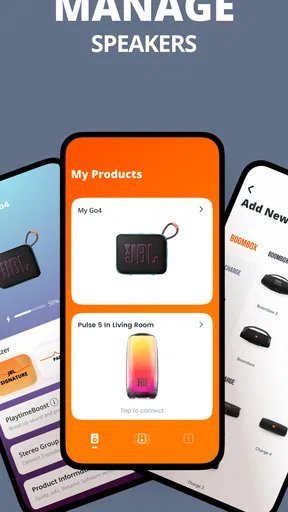
Once you’re in, the app interface is sleek and simple. It’s like the designers knew exactly what we’d want at our fingertips. You’ll see all your connected devices listed, and managing them is as easy as pie. Just tap on a device to adjust settings or sync multiple speakers for that surround sound feel.
Features That Stand Out
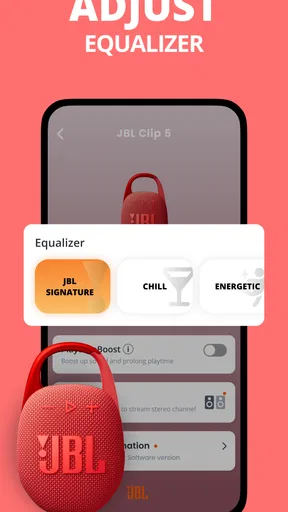
One of my favorite things about the app is the ability to customize the sound profile of your speakers. There’s an option for different presets, but if you’re like me and want to tweak things to your liking, you can manually adjust the bass, treble, and mids. Whether you’re into podcasts or heavy bass tracks, you can set it to match your vibe perfectly.
Another cool feature is the PartyBoost. This lets you connect multiple JBL speakers to really amp up your listening experience. I tried this out at a recent get-together, and it was a game-changer. The sound was crisp and filled the entire room effortlessly. The app made it super simple to manage all the connections without any hiccups.
User Experience and Design
The design of the app is minimalistic yet functional. I love that it doesn’t overwhelm you with unnecessary options. Everything you need is right there, and navigating through the app feels natural. Plus, the app is pretty lightweight, so it doesn’t hog your phone’s resources.
Notifications are non-intrusive, which I appreciate. The app will let you know if there are firmware updates for your devices, ensuring you always have the latest features and improvements. Keeping your devices updated has never been easier!
Compatibility and Performance
Compatibility-wise, the app works with a range of JBL speakers, from the older models to the latest releases. I had no issues connecting it to different devices, which is a huge plus. The connection is stable, and I didn’t experience any lag or dropouts even when moving around the house. That’s crucial when you’re trying to enjoy uninterrupted music or podcasts.
Performance-wise, the app is smooth. The developers seem to have put a lot of work into ensuring it’s glitch-free. Updates roll out regularly, which means they’re actively working on making it better. It’s always nice to see an app that’s well-supported by its developers.
Wrapping It Up
All in all, the app is a must-have if you own JBL speakers. It enhances the overall experience by giving you control right at your fingertips. From sound customization to seamless connectivity, it checks all the boxes. Whether you’re using it for casual listening or a full-blown party, it won’t disappoint.
So, if you’re someone who loves to keep things simple but powerful, give the JBL Portable app a go. It’s free, easy to use, and will definitely elevate your audio experience. Happy listening!
When a different approach makes more sense
For a casual listener who uses one compatible speaker in one room, the app is best viewed as a setup and occasional adjustment tool. You may spend very little time in it after getting comfortable with the speaker. That is not a flaw, but it does mean the benefit is practical rather than constant: you get more value if you like tuning sound, checking device options, or occasionally bringing more than one speaker into your routine.
If your main goal is to control playback from across the room, start with the controls in your music service or on the phone itself. Those are usually the more direct route for play, pause, and track selection. If your goal is to make the speaker sound better for a particular room or manage compatible speakers together, this app is the more relevant place to look. Keeping those jobs separate prevents the common frustration of searching for a speaker setting inside a streaming app.
Small habits that prevent avoidable friction
When a speaker does not appear in the app, I’d first check that it is powered on and connected to the phone over Bluetooth, then reopen the app and look again. If it still does not show up, checking whether that specific model is supported is more useful than repeatedly tapping through menus. This is a simple distinction, but it saves time: connection problems and model compatibility are different issues, and the right first check depends on which one you may be facing.
For a shared-room setup, I’d also decide where each speaker will sit before grouping them. Test the connection with the devices close together, then move them to their intended positions and listen from the place people will actually sit. This makes it easier to notice whether one speaker is too close to a wall or whether the group is unevenly placed. It is not a special app trick; it is a repeatable way to get more dependable results from the setup the app helps you manage.
Overall, I’d recommend JBL Portable to someone who owns a compatible JBL portable speaker and wants a straightforward companion for its settings and speaker connections. I would skip it if I had no compatible hardware, or if all I wanted was a basic music player, since that is not its purpose. For the right owner, its strongest quality is focus: it keeps speaker-related tasks together without trying to replace the apps I already use to find and play audio.
Pros
- User-friendly interface for quick navigation.
- High-quality audio streaming with minimal lag.
- Seamless Bluetooth connectivity with devices.
- Customizable sound settings for personal taste.
- Supports multiple speaker connections easily.
Cons
- Limited compatibility with older devices.
- Occasional app crashes on some smartphones.
- Requires frequent updates for optimal use.
- In-app ads can be intrusive at times.
- Battery drain is noticeable during extended use.
FAQs for JBL Portable
What features does the JBL Portable app offer?
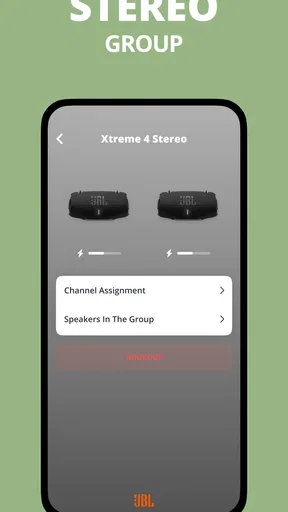
The JBL Portable app allows users to manage their JBL speakers seamlessly. Key features include the ability to customize equalizer settings, update speaker firmware, access party mode, and link multiple speakers for a stereo sound experience. The app also provides easy access to user guides and troubleshooting tips.
Is the JBL Portable app compatible with all JBL speakers?
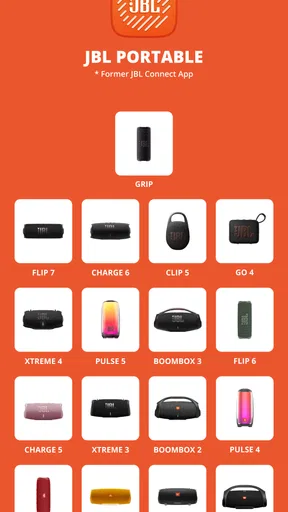
While the JBL Portable app supports a wide range of JBL speakers, compatibility may vary depending on the model and its firmware. It's essential to check the app's compatibility list or the specific product page to ensure your speaker model is supported before downloading the app.
How do I connect my JBL speaker to the app?
To connect your JBL speaker to the app, ensure that your speaker is powered on and your device's Bluetooth is enabled. Open the JBL Portable app, and it will automatically search for nearby JBL devices. Once your speaker appears in the list, select it to establish a connection and begin managing your audio settings.
Does the JBL Portable app require an internet connection?
The JBL Portable app primarily requires Bluetooth to connect and manage your speakers. However, an internet connection may be necessary for tasks such as downloading firmware updates or accessing online support features. Most primary functions of the app can be used without an internet connection.
Can I use the JBL Portable app on both Android and iOS devices?
Yes, the JBL Portable app is available for both Android and iOS platforms. Users can download it from the Google Play Store for Android devices and the App Store for iOS devices. Ensure your device meets the minimum system requirements for optimal performance and compatibility.


